AI Face-Tracking 3-Axis Phone Gimbal with Selfie Stick
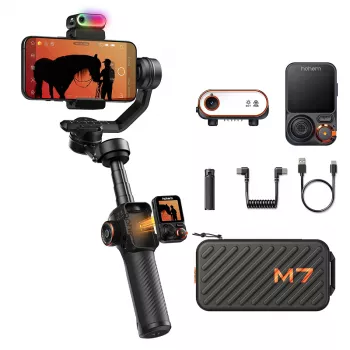
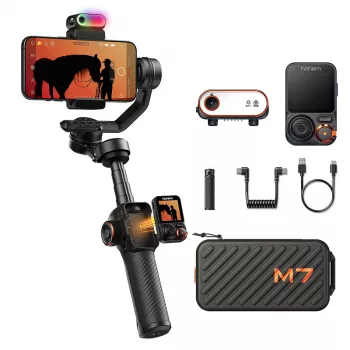
3-Axis Smartphone Gimbal with AI Face Tracking and Built-In Selfie Stick
Smooth handheld video is one of the fastest upgrades a phone creator can make—especially when filming people, walking shots, or solo content. Our team built this 3-axis smartphone gimbal to steady motion in real time, keep faces centered with AI tracking, and switch from a comfortable grip to extended selfie-stick reach without changing gear. If you’re tired of “almost usable” clips that wobble, drift off-frame, or feel hectic, this setup is designed to make your phone footage look more intentional with less reset time between takes.
What this gimbal is built to solve
Handheld phone video usually breaks down in a few predictable ways: micro-shakes from your hands, bounce from walking, and constant reframing when your subject moves. A 3-axis gimbal addresses these by stabilizing rotation across three axes so your movement doesn’t translate into the same on-screen jitter. (If you want the technical definition of a gimbal and why multiple axes matter, see this overview.)
- Turns shaky handheld clips into steadier footage by balancing the phone across three axes during movement
- Reduces the need for constant reframing during solo filming by following a face as it moves
- Combines everyday creator tools in one: handheld stabilizer + tracking + built-in selfie-stick reach for wider framing
- Supports quick transitions between filming styles: talking-to-camera, walking follow, and group shots
Where AI face tracking makes the biggest difference
Stabilization smooths motion; tracking helps you stay composed. When you’re the on-camera subject (or filming someone who won’t stay perfectly centered), AI face tracking is the feature that reduces retakes—because it’s handling small framing corrections while you focus on delivery.
- Solo creators: keeps you centered while demonstrating products, cooking, workouts, or tutorials
- Live-style filming: reduces the need to stop and reposition when stepping forward/back or turning
- Small spaces: helps maintain framing even if you can’t move the camera position much
- Group moments: helps keep attention on the primary speaker during quick updates or recaps
Everyday filming modes this setup supports
This is the kind of tool you can keep near your desk and actually use daily. It’s practical for “shoot now” moments, not just special projects, because it covers common creator shots without requiring a separate extension pole or a complicated rig.
- Walking shots: stabilizes your movement so steps look less bouncy
- Talking-head content: steadier framing for direct-to-camera clips without a tripod-first workflow
- Overhead and angled demos: easier hand positioning for unboxings, crafts, cooking, and beauty routines
- Quick b-roll: smoother pans and reveals for product, travel, and lifestyle sequences
- Selfie-stick framing: wider composition options without adding a separate extension accessory
Quick fit guide for common shooting scenarios
| Scenario | What to prioritize | Why it helps |
|---|---|---|
| Solo talking-to-camera | AI face tracking + steady hold | Keeps framing consistent even with natural movement |
| Walking vlog or tour | 3-axis stabilization | Reduces bounce and jitter from steps |
| Workout or dance content | Face tracking + wider framing (selfie-stick reach) | Stays centered during faster movement |
| Product demo at a desk | Stable angle + smooth pans | Cleaner close-ups and controlled motion |
| Group selfie video | Selfie-stick reach + steady framing | Fits more people while keeping motion smoother |
A simple setup flow for smoother results
You don’t need a long checklist to get clean footage, but a consistent routine prevents most avoidable issues (drift, crooked horizons, hunting tracking). Here’s a quick flow our team uses when filming on a phone.
- Balance first: mount your phone securely so stabilization isn’t fighting uneven weight
- Choose your shot: use tracking for people-first scenes; use stabilization-only for environment-first shots
- Lock the basics: keep orientation consistent (vertical for shorts, horizontal for long-form) and frame intentionally
- Move with purpose: smaller steps and softer starts/stops look cleaner; let the gimbal handle the rest
- Do a 5-second test clip: confirm framing, exposure, and tracking before rolling a longer take
If you’re adjusting camera settings on iPhone, Apple’s guide is a solid reference for recording options and modes: Record videos with the iPhone camera.
How to get more cinematic movement with a phone
A gimbal doesn’t replace creative decisions—it makes them easier to execute. Once your footage is stable, small choices in movement and composition start to read as “cinematic” instead of “accidental.”
Recommended picks from our store
- 3-Axis Smartphone Gimbal with AI Face Tracking and Built-In Selfie Stick — our go-to choice when you want stabilization, tracking, and built-in reach in one tool.
- Alviero Martini Prima Classe Women’s Beige Bag with Zip — a stylish everyday bag option when you want a polished look on camera and off.
- Dolce & Gabbana Gold Charm Necklace with Carretto Pendants and Crystals — a statement accessory that can elevate on-camera presence for interviews, hosts, and event content.
FAQ
Does a 3-axis smartphone gimbal replace a tripod?
Not completely. A gimbal is best when you’re moving and want smooth handheld motion, while a tripod is best for locked-off, hands-free shots; many creators use both depending on the scene.
When should AI face tracking be turned on?
Turn it on for people-first scenes like talking clips, demonstrations, workouts, and tutorials where you move naturally. Turn it off for controlled pans, scenery shots, or anytime you want to reframe away from the subject on purpose.
Is a built-in selfie stick useful beyond selfies?
Yes—extra reach helps you get wider framing for solo content, fit more people into group video, and change perspective for overhead or angled demos without relocating your entire setup.








Leave a comment