2-Piece Wrist Rest Set for Keyboard & Mouse Comfort
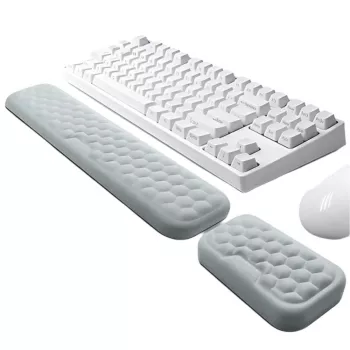
2Pcs Ergonomic Mouse & Keyboard Wrist Rest Set: Comfort Support for Daily Desk Work
A wrist rest set can reduce pressure points and help keep hands aligned during long sessions of typing and mousing. This 2-piece set includes a keyboard wrist rest and a mouse wrist rest designed to add cushioning, promote a more neutral wrist position, and make everyday desk tasks feel easier.
If your desk edge feels harsh on your palms, or your mouse hand stays planted for hours at a time, a small comfort upgrade can make a noticeable difference. The 2Pcs Ergonomic Mouse & Keyboard Wrist Rest Set is built to give your hands a softer “landing zone” while still keeping movement natural.
What Comes in the 2-Piece Set
This set is straightforward: one pad supports typing breaks at the keyboard, and the other supports the heel of the hand near the mouse. The goal is comfort without restricting how your fingers and wrist move while you work.
- Keyboard wrist rest pad designed to sit along the front edge of a keyboard
- Mouse wrist rest pad designed to sit in front of or alongside a mouse
- Purpose: provide a soft landing zone for the heel of the hand while allowing fingers to move freely
- Works for home offices, campus study setups, gaming desks, and shared workstations
Set Overview
| Item | Where it sits | Primary benefit | Best for |
|---|---|---|---|
| Keyboard wrist rest | In front of the keyboard | Cushions the heel of the palms during typing pauses | Long emails, reports, schoolwork |
| Mouse wrist rest | In front of/near the mouse | Reduces contact pressure during mouse control | Design work, browsing, gaming |
Who Benefits Most
Wrist rests aren’t only for “ergonomics enthusiasts.” They’re helpful for anyone whose hands regularly meet a hard surface while working at a computer—especially when a task encourages the wrist to stay anchored.
- People who type for extended periods and notice wrist fatigue or desk-edge pressure
- Mouse-heavy workflows (spreadsheets, design tools, editing, customer support)
- Hybrid workers moving between different desks and needing consistent comfort
- Gamers who keep hands planted for stability during long sessions
- Anyone using higher-profile keyboards where palms tend to rest on the desk surface
Common Desk Setups and Suggested Placement
| Setup | Typical issue | Wrist rest placement tip |
|---|---|---|
| Laptop + external mouse | Mouse hand anchored on hard desk surface | Use the mouse rest; keep the laptop keyboard area clear unless using an external keyboard |
| External keyboard + mouse | Desk-edge pressure at keyboard and mouse | Align keyboard rest with the spacebar edge; place mouse rest where the wrist naturally lands |
| Gaming keyboard + low DPI mouse movement | Wrist planted for control | Keep rests stable; ensure enough room for broad mouse sweeps |
Comfort and Ergonomics Basics (Without Overthinking It)
A wrist rest is most effective when it supports a neutral alignment rather than encouraging you to “lean” on it. Think of it as a cushion for brief contact points, not a platform to press into.
Quick Alignment Check
| Area | Good sign | Adjustment if not |
|---|---|---|
| Wrists | Mostly straight line from forearm to hand | Raise/lower chair, change keyboard tilt, reposition rests |
| Forearms | Not bearing all weight on desk edge | Move rests closer, add forearm support, soften contact points |
| Shoulders | Relaxed, not elevated | Lower armrests, bring keyboard/mouse closer, reduce reach |
For broader workstation guidance, these resources offer practical setup checks: NIOSH ergonomics, OSHA computer workstations, and the Mayo Clinic office ergonomics guide.
How to Place and Use the Wrist Rests
Placement Mistakes to Avoid
| Mistake | Why it matters | Simple fix |
|---|---|---|
| Rest too far from keyboard | Forces reaching and wrist angle changes | Move rest up to the keyboard edge |
| Typing while pressing hard into the cushion | Increases pressure on soft tissues | Use it for pauses; keep hands light during keystrokes |
| Mouse rest blocks movement | Causes awkward grip or wrist twist | Shift rest slightly or rotate it to match hand path |
What to Look For in a Wrist Rest Set
Feature Checklist
| Feature | Why it helps | What to verify at your desk |
|---|---|---|
| Balanced firmness | Comfort with less pressure concentration | Press with palm: should compress but not flatten completely |
| Stable base | Prevents constant repositioning | Try a few mouse sweeps; pad should remain aligned |
| Adequate coverage | Supports typical resting points | Hands should land naturally without hunting for the pad |
| Easy maintenance | Keeps surface comfortable over time | Wipes clean without leaving residue |
Practical Pairings for a More Comfortable Desk
Small Changes That Add Up
| Change | Time needed | Expected benefit |
|---|---|---|
| Bring keyboard and mouse closer | 1 minute | Less reaching and shoulder tension |
| Level the keyboard (reduce steep tilt) | 2 minutes | More neutral wrist angle |
| Add a short break every 30–60 minutes | Ongoing | Less fatigue over long sessions |
For a home setup that stays pleasant day after day, it can also help to reduce distractions and interruptions: if your “coworker” is a curious cat, a dedicated perch like the Cactus Cat Tree Tower with Scratching Post & Condo Nest can keep pets engaged away from your keyboard area. And if you split time between locations, a work-ready carry option like the Alviero Martini Prima Classe Women’s Beige Bag with Zip can make it easier to bring your essentials along.
FAQ
Should wrists rest on the pads while typing?
Use the pads mainly to support the heel of your hands during pauses. While actively typing, keep your wrists neutral and avoid pressing down hard into the cushion.
How do you position the mouse wrist rest correctly?
Place it where the heel of your mouse hand naturally lands, without blocking mouse movement. Adjust until your wrist feels straight and steering the mouse feels effortless.
Can a wrist rest help with wrist pain?
It may reduce contact pressure and improve comfort, but pain can have multiple causes. Combine a wrist rest with better posture and workstation adjustments, and seek medical advice if symptoms persist.









Leave a comment