Mesh Office Chair Comfort: Headrest + Flip-Up Arms
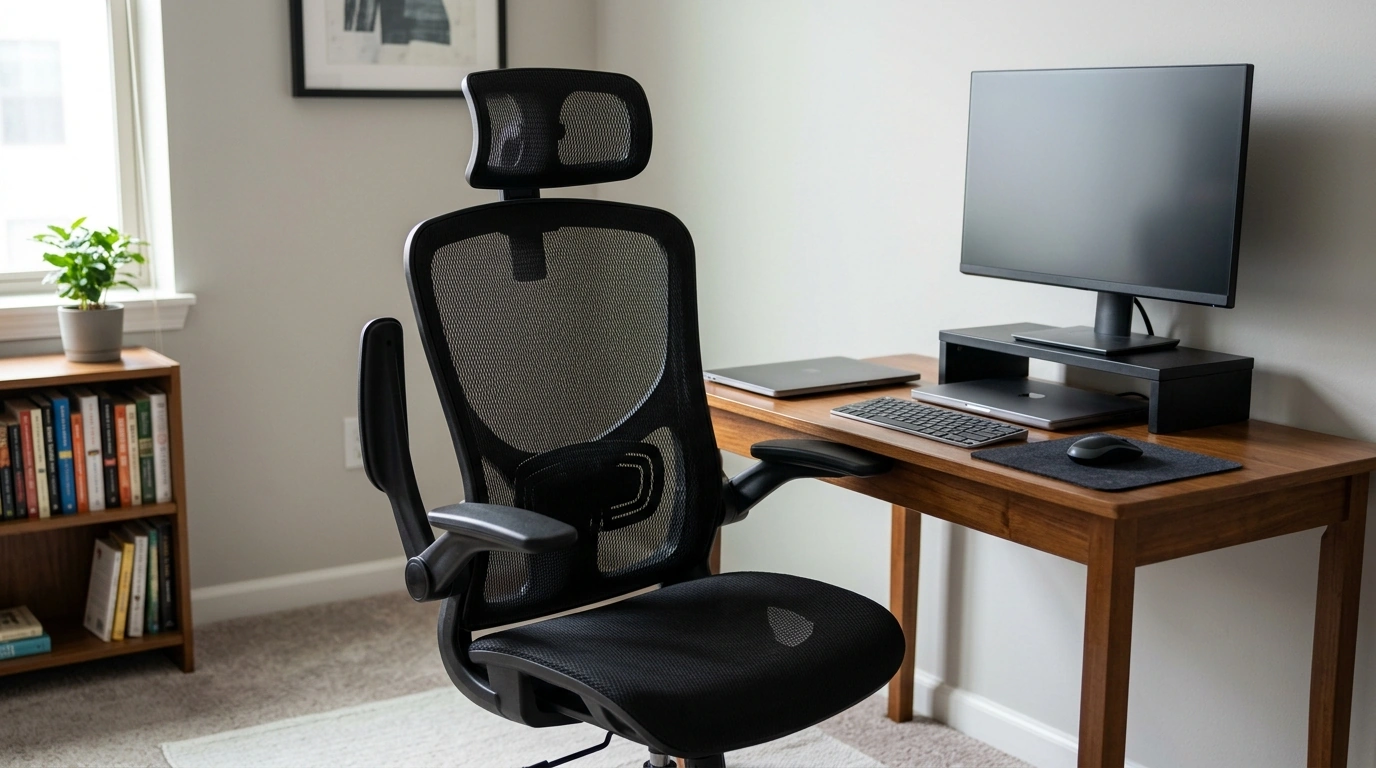
Ergonomic Mesh Office Chair Comfort That Fits Real Workdays
A supportive chair can make long desk sessions feel noticeably lighter on the neck, shoulders, and lower back. The Ergonomic Mesh Office Chair with Adjustable Headrest and Flip-Up Armrests combines a breathable mesh back with practical adjustability, so it can adapt to focused computer work, study blocks, and smaller room layouts. When the chair supports you well, it’s easier to stay steady at your desk—without constantly shifting to relieve pressure or heat buildup.
Ergonomics is also about the full workstation setup (screen height, keyboard position, and movement breaks). For general guidance on arranging a computer station, helpful references include the NIOSH Computer Workstations guidance and the Mayo Clinic office ergonomics overview.
What Makes This Chair Comfortable for Long Sessions
Comfort over hours usually comes from a mix of airflow, supportive shaping, and the ability to fine-tune contact points. This chair focuses on the areas that commonly fatigue first—upper back/neck and shoulders—while staying flexible for different desk and room needs.
- Breathable mesh back: encourages airflow to reduce heat buildup during extended sitting.
- Adjustable headrest: helps support the neck during focused computer work, calls, or short reclining breaks.
- Flip-up armrests: create extra clearance to slide the chair under a desk or accommodate guitar/keyboard practice.
- Ergonomic shaping: designed to encourage a more neutral seated posture with less slouching.
- Flexible placement: suitable for mixed-use spaces such as home offices, dorm rooms, and compact workstations.
Mesh is especially useful if your room runs warm or you tend to sit for long stretches—airflow can reduce that “stuck to the chair” feeling that pushes people to perch forward and lose back support.
Key Adjustments and How to Dial Them In
Even a solid ergonomic chair can feel “off” if it’s set too high, too low, or if the headrest is positioned in a way that nudges the head forward. A few quick tweaks usually make a noticeable difference within a day or two of use.
- Headrest: raise/lower so it cradles the base of the skull rather than pushing the head forward.
- Armrests: keep down for typing support; flip up when more lateral space is needed or when storing under a desk.
- Seat height: set so feet rest flat and knees are roughly level with hips.
- Back support: sit back fully so the spine stays supported rather than hovering forward.
- Work habits: take brief standing or walking breaks to complement any chair’s ergonomics.
Quick Setup Guide
| Adjustment | Target position | Common mistake to avoid |
|---|---|---|
| Seat height | Feet flat, knees near 90° | Sitting too high and dangling feet |
| Headrest height | Supports neck/base of skull | Pushing head forward into a “chin jut” posture |
| Armrests (down) | Elbows relaxed near sides | Shrugging shoulders to reach armrests |
| Armrests (flipped up) | Clearance for desk/storage | Leaning on one side due to missing support |
| Monitor alignment | Top of screen near eye level | Looking down for hours, straining neck |
Fit, Space, and Use Cases
The details that seem small—like armrests that lift out of the way—can make a chair feel far more “compatible” with the room you actually have. This is especially important for apartments, dorms, and shared spaces where every inch counts.
- Compact rooms: flip-up armrests help the chair tuck closer to desks to save floor space.
- Shared workstations: headrest and armrest flexibility supports quick handoffs between users.
- Task-focused work: mesh and supportive shaping aim to keep posture steadier during typing and mousing.
- Study setups: works well with smaller desks where armrest clearance matters.
- Occasional lounging: head/neck support can make short reclines more comfortable (depending on desk and posture).
If you switch between “work mode” and “push the chair under the desk to clear space” mode, flip-up armrests can be a daily convenience—not just a feature you use once.
Care, Cleaning, and Everyday Durability Tips
Routine maintenance keeps an office chair feeling stable and looking presentable, especially in high-use home setups. A few minutes a month can help prevent squeaks, wobble, and uneven rolling.
At-a-Glance Product Snapshot
Current Listing Details
| Item | Details |
|---|---|
| Product | Ergonomic Mesh Office Chair with Adjustable Headrest and Flip-Up Armrests |
| Price | 63.67 USD |
| Availability | In stock |
| Product page | https://magdella.com/ergonomic-mesh-office-chair-with-adjustable-headrest-and-flip-up-armrests/ |
Other In-Stock Picks for a Smooth Daily Routine
- Alviero Martini Prima Classe Women’s Beige Bag with Zip for commuting essentials and keeping chargers, notebooks, or accessories organized.
- Cactus Cat Tree Tower with Scratching Post & Condo Nest for pet-friendly workspaces where giving cats their own perch can reduce desk interruptions.
- Dolce & Gabbana Gold Charm Necklace with Carretto Pendants and Crystals as a giftable option if you’re refreshing your work-and-weekend rotation.
FAQ
Are flip-up armrests useful for small desks?
Yes—flipping the armrests up can create the clearance needed to slide closer to the desktop, avoid bumping armrest edges, and tuck the chair under the desk for easier storage in tight spaces.
How should an adjustable headrest be positioned?
Set it so it supports the neck and the base of the skull without pushing your head forward. A quick check is to look straight at your monitor; your chin shouldn’t jut forward to “meet” the headrest.
How do you clean a mesh office chair?
Vacuum the mesh with a soft brush attachment, then spot clean using mild soap and water. Avoid harsh chemicals, and let the chair fully dry; occasional quick cleanups help prevent buildup.








Leave a comment