Mini RC Drone: HD Camera, 360 Flips, 2.4G + Return
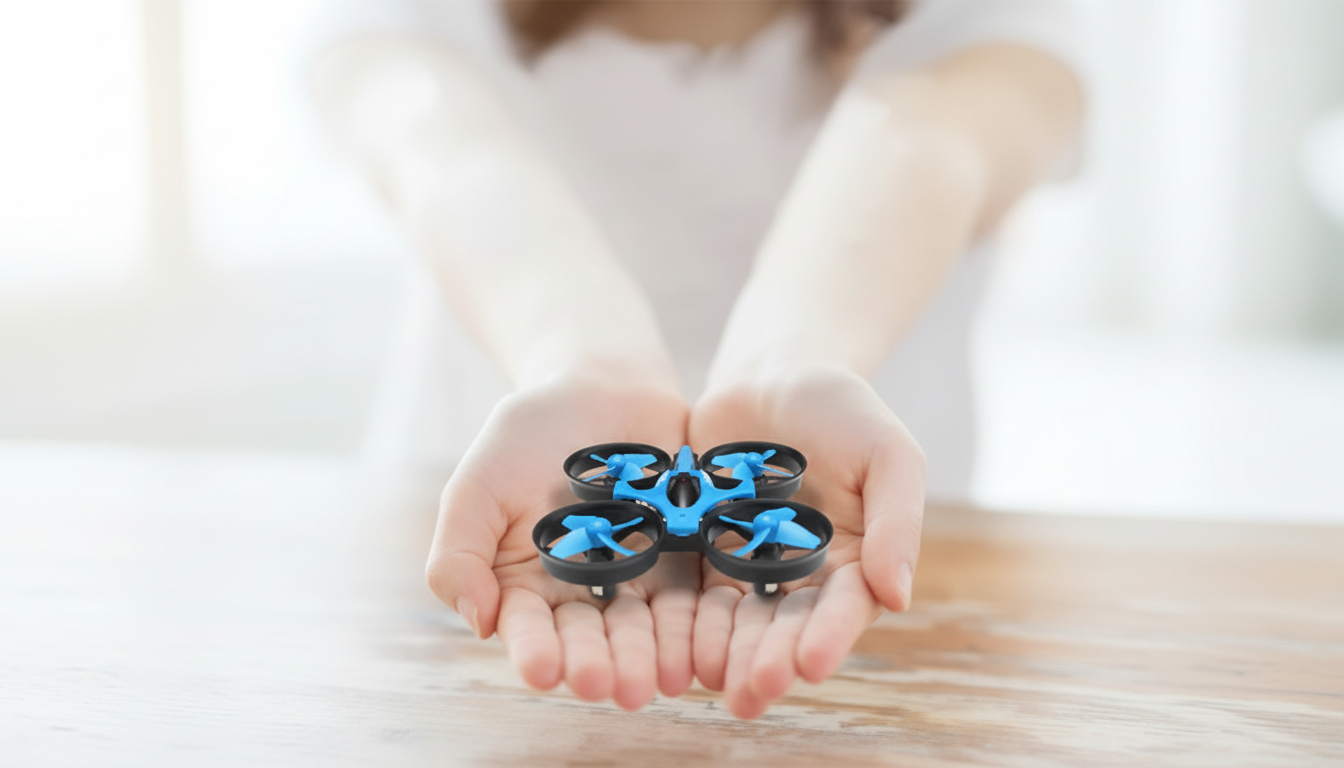
Mini RC Drone with HD Camera, 360° Flip, 2.4G Remote Control, One-Key Return
A compact quadcopter can be an easy way to learn basic flight skills while still getting fun features like an onboard HD camera, 360° flips, stable 2.4G control, and a simple one-key return. If you’re looking for a small drone that’s straightforward to fly indoors (and on calm days outdoors), the Mini RC Drone with HD Camera, 360° Flip, 2.4G Remote Control, One-Key Return is built around exactly that kind of “learn and play” experience.
Below is a practical breakdown of what these features do, what to expect in real use, and a few habits that can make your first flights smoother and your footage more watchable.
Quick look at what this mini drone is built to do
- Designed for casual flying and learning core controls: takeoff, hover, turn, and land without the cost or complexity of advanced camera drones.
- HD camera adds simple recording for short clips and snapshots (usually best in bright light and at closer distances).
- 360° flip mode focuses on play and maneuver practice rather than precision filming.
- 2.4G remote control helps reduce interference compared with older single-band toy remotes, improving consistency for everyday practice.
- One-key return is a convenience feature for bringing the drone back toward the pilot, not a GPS-grade return-to-home system.
Feature breakdown: how each function helps in real flights
HD camera: fun clips, best at close range
An HD camera on a mini drone is ideal for quick overhead looks, family moments in the backyard, and short “what it looks like from above” clips. The biggest improvement usually comes from flying slower than you think you need to: hover first, then make gentle moves, and keep turns gradual so the video doesn’t smear or wobble.
360° flips: a great way to practice recovery
Flip mode is typically triggered by a dedicated button, letting the drone roll or flip on command. It’s most consistent when you have extra altitude (so the drone can complete the maneuver and stabilize) and when the air is calm—often indoors away from fans or strong vents.
2.4G control: steadier connection for typical home use
2.4G is the common radio band used by many RC devices, and it generally provides a more reliable control link than infrared controllers (which can be more limited by line-of-sight). You’ll still get the best results by maintaining visual line-of-sight, keeping distance reasonable, and avoiding especially crowded RF environments when possible.
One-key return: an “orientation helper,” not autopilot navigation
When a drone is facing you, left/right controls can feel reversed—this is where one-key return can reduce panic. Think of it as a quick assist that nudges the drone back toward you so you can regain orientation, not as a guaranteed straight-line trip back to the exact launch point.
Mini size: easy storage, more wind-sensitive outdoors
The mini frame is convenient to pack and store, and it’s often less intimidating for new pilots. The tradeoff is that lighter drones are more affected by wind, so outdoor sessions are best saved for calmer days or very sheltered areas.
Specs and capabilities at a glance
Mini drone features overview
| Capability | What it does | Best use case | Practical tip |
|---|---|---|---|
| HD camera | Records basic aerial video/photos | Daytime indoor/outdoor clips at close range | Hover first, then move slowly for less shake |
| 360° flip | Performs a full roll/flip on command | Tricks and learning orientation recovery | Gain a few meters of height before flipping |
| 2.4G remote control | Maintains control link on a common RC band | General flying with fewer dropouts | Keep antennas unobstructed and stay in line-of-sight |
| One-key return | Initiates a return movement toward the pilot | Quick recovery when the drone drifts away | Test at short distance; do not rely on it like GPS RTH |
| Mini frame | Small, lightweight body | Indoor practice and calm outdoor days | Avoid wind; start indoors to build muscle memory |
Getting better video: simple habits that improve HD footage
First-flight setup and safety basics
- Pick a training area: start with an open room indoors, or a calm, open yard outdoors.
- Calibrate/trim if the drone drifts: small trim adjustments can help you maintain a steadier hover.
- Practice orientation early: “nose-out” (facing away) feels natural; “nose-in” (facing you) is the main beginner challenge.
- Use flip mode after hover is consistent: stable hovering reduces hard landings and prop strikes.
- Check local rules before outdoor flights and keep clear of people, pets, and traffic. For U.S. guidance, review the FAA’s recreational safety info at FAA — Flying for Fun (Recreational UAS Safety Guidance) and use FAA — B4UFLY to help confirm where you can fly.
Who this mini RC drone fits best
Common issues and quick fixes
In-stock picks on Magdella
- Mini RC Drone with HD Camera, 360° Flip, 2.4G Remote Control, One-Key Return
- Cactus Cat Tree Tower with Scratching Post & Condo Nest
- Alviero Martini Prima Classe Women’s Beige Bag with Zip
FAQ
Does one-key return bring the drone back to the exact takeoff spot?
No—one-key return is usually a simplified return assist without GPS navigation, so it helps move the drone back toward you but may not return precisely to the launch point. Practice using it at short range so you can take over and land smoothly.
Can the HD camera record usable video indoors?
Yes, especially in well-lit rooms. Fly slowly, hover before turns, and add more lighting if possible to reduce blur and grain.
Is a 2.4G remote control better than infrared or older remotes?
Generally yes: 2.4G control is typically more reliable and less restricted than infrared, which often needs clearer line-of-sight. Interference and obstacles can still affect performance, so keep the drone visible and avoid overly crowded signal areas.








Leave a comment