USB/XLR Dynamic Gaming Mic: RGB, Mute, Noise Cut
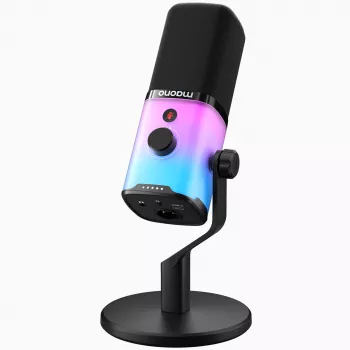
Dynamic USB/XLR Gaming Microphone with RGB, Mute, and Noise Reduction
A dual-connection gaming microphone can simplify a setup today and still fit an upgraded audio chain later. This model combines USB convenience with XLR expandability, plus quick mute control, noise reduction support, and RGB accents designed for streaming and voice chat. If the goal is a confident, close-up voice that doesn’t crumble the moment a keyboard gets loud or a room gets echoey, a dynamic mic built for near-field use is a practical starting point. For more guidance, see Reviews by Ichos | Page 10.
What This Microphone Is Designed For
- Gaming voice chat that stays clear during fast, loud sessions
- Streaming and content creation where background sounds need to be minimized
- Work calls and online classes that benefit from a consistent, close-up voice tone
- Upgrade paths: start on USB, move to XLR with an audio interface or mixer later
Dynamic microphones are frequently chosen for spoken voice in everyday rooms because they’re typically less sensitive to distant sound than many condenser designs. For a deeper comparison of mic types, see Shure’s guide to dynamic vs. condenser microphones. For further reading, see Maono PD200X USB/XLR Dynamic Microphone.
USB and XLR: Two Ways to Plug In
One of the most useful features here is flexibility: USB for immediate plug-and-play, and XLR for a more traditional audio chain when it’s time to add an interface, mixer, or outboard processing. The practical benefit is longevity—your core microphone doesn’t have to change just because the rest of the rig evolves.
- USB connection for quick plug-and-play use with common desktop setups
- XLR output for pairing with mixers, audio interfaces, and broadcast-style workflows
- Practical benefit: the same mic can follow a setup from starter to advanced without replacing the core microphone
- Cable management tip: keep the unused cable path tidy to reduce desk clutter and accidental tugging
| Connection | Best for | What else is needed | Typical advantage |
|---|---|---|---|
| USB | PC/console-style desk setups and quick start | Usually nothing beyond the included cable | Fast setup and simple controls |
| XLR | Interfaces/mixers and multi-source audio rigs | Audio interface or mixer + XLR cable | More flexible gain routing and system expansion |
Dynamic Capsule: Clear Voice with Less Room Noise
This microphone uses a dynamic capsule, which generally rewards close placement. That close-mic approach boosts vocal presence while helping de-emphasize room reflections, PC fan noise, and other “across the room” distractions. In other words: it’s designed to sound best when used like a broadcast mic, not like a far-away tabletop mic.
- Dynamic microphones are often chosen for spoken voice in untreated rooms because they tend to pick up less distant sound than many condenser designs
- Best placement: keep the mic close (roughly a hand’s width) to improve clarity and reduce keyboard/room pickup
- Angle and distance matter: speaking across the mic (slightly off-axis) can reduce plosives while keeping intelligibility strong
- If the voice sounds thin, move slightly closer; if it booms, back off a little and reduce gain
Mute Control and Noise Reduction: Practical Use During Games and Calls
Live voice situations are messy—coughs happen, a snack crunch is louder than expected, and sometimes someone walks into the room mid-call. A quick mute control keeps those moments private without digging through software menus. Noise reduction can also help, but it’s most effective when it’s cleaning up a good signal rather than trying to rescue a distant, quiet voice.
If teammates report robotic voice, stuttering, or sudden volume pumping, it’s worth checking app-level settings and input routing. Discord’s Voice and Video troubleshooting is a solid reference for common chat issues.
RGB Lighting: When It Helps (and When to Keep It Subtle)
Setup Tips for Cleaner Audio
For Windows users, adjusting the system input level can prevent either clipping (too hot) or hiss (too quiet with excessive boosting). Microsoft’s overview on changing microphone volume is available here: Microsoft Support.
Quick Specs and Buying Snapshot
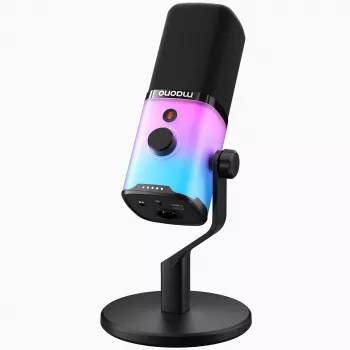
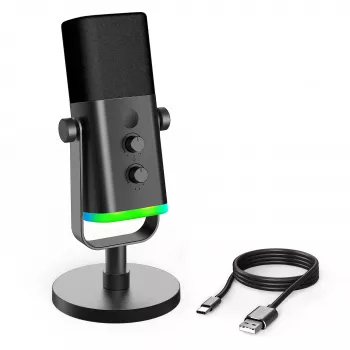
Dynamic USB/XLR Gaming Microphone with RGB, Mute, and Noise Reduction is built for gaming chat, streaming, and everyday voice capture, with a straightforward upgrade path to an XLR interface/mixer later. Availability can change, so confirm stock status before checkout. For energetic close-mic use, many setups benefit from adding an arm, pop filter, or windscreen.
| Item | Details |
|---|---|
| Name | Dynamic USB/XLR Gaming Microphone with RGB, Mute, and Noise Reduction |
| Price | $75.32 USD |
| Availability | In stock |
| Primary uses | Gaming, streaming, voice chat, calls |
| Notable features | USB + XLR, RGB lighting, mute control, noise reduction support |
More In-Stock Picks
- Cactus Cat Tree Tower with Scratching Post & Condo Nest
- Alviero Martini Prima Classe Women’s Beige Bag with Zip
- Dolce & Gabbana Gold Charm Necklace with Carretto Pendants and Crystals
FAQ
Does USB sound different from XLR on the same microphone?
Usually the capsule’s character stays the same, but the signal chain changes: USB uses the mic’s internal converter, while XLR depends on the quality and settings of your external interface or mixer. Any difference you hear typically comes from preamp quality, gain staging, and processing choices.
How close should a dynamic gaming microphone be to sound clear without picking up keyboard noise?
A good starting range is about 5–15 cm (2–6 inches) from your mouth, speaking slightly off-axis. Keep gain moderate and aim the mic’s pickup away from the keyboard; increasing distance is the biggest reason keyboard noise becomes more noticeable.
Should noise reduction be turned on all the time?
Use it sparingly. Light noise reduction can help with steady fan noise, but aggressive settings often create watery or robotic artifacts; start with close placement and basic noise control first, then add only as much reduction as needed.








Leave a comment