Wireless TKL 87-Key Hot-Swap Keyboard with RGB
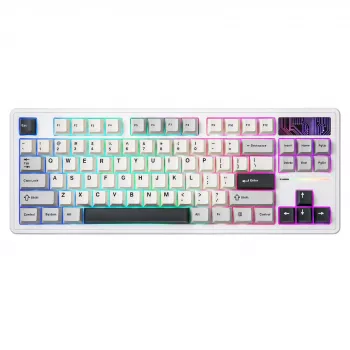
Wireless Hot-Swappable TKL 87-Key Mechanical Gaming Keyboard with RGB Backlighting
A tenkeyless mechanical keyboard can free up desk space for broader mouse movement while keeping the keys used most in gaming and daily typing. This wireless 87-key model adds hot-swappable switches for easy customization and RGB backlighting for visibility and style, making it a flexible option for setups that need both performance and a cleaner footprint.
Why a TKL layout works for gaming and everyday typing
Going TKL (tenkeyless) is one of the simplest ways to make a setup feel less cramped without sacrificing core functionality. With the number pad removed, your mouse naturally sits closer to your typing position, and your forearm doesn’t have to reach as far during long sessions.
- More room for mouse travel than a full-size board, which is especially helpful for lower-sensitivity aim and compact desks.
- Keeps the function row and navigation cluster, so everyday shortcuts (media keys, browser controls, F-keys in games) remain within easy reach.
- A balanced footprint for shared use: gaming, work, and general productivity without committing to an ultra-compact layout.
Wireless performance: what matters day to day
Wireless keyboards live or die by consistency. A stable connection that stays paired and resists interference usually matters more than chasing maximum theoretical range. In real rooms with routers, phones, and USB devices, reliability is what makes a wireless board feel “wired-like.”
- Connection stability: prioritize steady pairing and minimal dropouts for predictable inputs during gameplay or fast typing.
- Latency considerations: wireless can feel highly responsive when interference is managed and the host connection is clean.
- Practical placement tips: when possible, keep the receiver/host away from USB 3.0 noise sources, and avoid blocking the signal path with metal objects.
For a deeper technical reference on how devices report inputs and interact at the interface level, see the USB Implementers Forum’s USB HID (Human Interface Device) Usage Tables. If you’re using Bluetooth mode, the official Bluetooth Core Specification is a helpful baseline for understanding profiles and version behavior.
Hot-swappable switches: customizing feel without soldering
Hot-swap support is one of the most practical upgrades in modern mechanical keyboards. Instead of committing to one switch feel for the life of the keyboard, you can replace compatible switches whenever you want—no soldering and no permanent modification.
- Swap compatible mechanical switches to tune sound and feel (lighter, heavier, tactile, linear) without needing specialized tools or skills.
- Replace a single failing switch instead of replacing the entire keyboard, which is a big win for longevity.
- Experiment with different switch types: smooth and fast for gaming, or more feedback-focused for typing accuracy.
Common switch feel profiles (general guidance)
| Type | Feel | Typical use case | Sound |
|---|---|---|---|
| Linear | Smooth press, no bump | Fast key repeats, gaming | Often quieter (varies by build) |
| Tactile | Noticeable bump | Typing accuracy, mixed use | Moderate |
| Clicky | Bump + click mechanism | Strong feedback preference | Loud |
RGB backlighting: comfort, visibility, and setup style
RGB lighting isn’t only about looks. For late-night sessions or darker rooms, backlighting can reduce the need for harsh overhead lights, helping keys stay readable without turning the entire room into a studio.
- Improves key visibility in low light and can help keep your environment comfortable at night.
- Adjustable brightness and multiple lighting modes make it easier to match different tasks (subtle for work, animated for play).
- On battery power, brighter settings and animated effects typically reduce runtime—static, lower-brightness modes usually last longer.
Build and ergonomics to pay attention to
Mechanical keyboards are long-session tools, so the details matter. Small build choices can influence how a keyboard feels after hours of use.
- Keycaps and legends: clear legends are easier to scan at a glance; shine-through legends help when you depend on backlighting.
- Stabilizers: larger keys (Space, Enter, Shift) feel better with good stabilizers, reducing rattle and keeping presses consistent.
- Typing angle: adjustable feet let you tailor the slope; if you type or game for extended periods, a wrist rest can improve comfort.
Quick spec checklist before buying
Use this short checklist to verify the keyboard matches your setup and your upgrade plans—especially if you want to change switches later.
| Feature | Why it matters | Notes to confirm |
|---|---|---|
| TKL 87-key layout | More mouse room, compact desk fit | No dedicated number pad |
| Hot-swappable sockets | Easy switch replacement/customization | Confirm switch type compatibility |
| RGB backlighting | Visibility and personalization | Brightness/mode controls |
| Wireless connection | Cleaner desk, flexibility | Interference management and stable pairing |
Wireless Hot-Swappable TKL 87-Key Mechanical Gaming Keyboard RGB Backlit: who it fits best
This style of keyboard is a strong match for setups that value both performance and flexibility. The TKL layout keeps your desk feeling open, wireless reduces cable clutter, and hot-swap support makes it easier to refine your setup over time.
In-stock picks
- Wireless Hot-Swappable TKL 87-Key Mechanical Gaming Keyboard RGB Backlit
- Cactus Cat Tree Tower with Scratching Post & Condo Nest
- Alviero Martini Prima Classe Women’s Beige Bag with Zip
FAQ
What does hot-swappable mean on a mechanical keyboard?
Hot-swappable means you can remove and replace compatible mechanical switches without soldering. Compatibility depends on the keyboard’s socket type and the switch pins, but it generally makes customization and repairs much easier.
Is a TKL keyboard good for gaming?
Yes—TKL is popular for gaming because it frees up mouse space while keeping the function row and essential keys like arrows and navigation. The main trade-off is losing the number pad, which some users prefer for data entry or macros.
Does RGB backlighting reduce battery life on a wireless keyboard?
Usually, yes: higher brightness and animated lighting effects draw more power and shorten runtime. Lower brightness or using static lighting typically helps the battery last longer between charges.








Leave a comment